Skip to content
CMS Expertise · WordPress

WordPress SEO. The most flexible — if you know the traps.

WordPress powers about 43 % of the web, but half of the WordPress sites we audit lose 20 to 40 % of their organic potential to plugin or theme choices that break SEO. Here's our method to turn WordPress into an advantage, not a handicap.

See our recommended stack
20+WP sites audited
6WP SEO levers
5pitfalls to avoid
3languages (FR · EN · AR)

Why WordPress is different

WordPress is an ecosystem, not a fixed platform.

The same WordPress site can rank #3 or #50 depending on theme, plugins, and configuration — with identical content. The ecosystem (60,000+ plugins, 11,000+ themes) gives total freedom, but each choice has precise SEO consequences. Our expertise consists of framing these choices from the start, or correcting them when the technical legacy is already in place.

Theme = performance ceilingA heavy theme (Divi, Avada, unoptimized Elementor) can drop your mobile LCP to 5-8 s — a red Core Web Vitals score. A light theme (GeneratePress, Blocksy, Astra) can maintain LCP under 2 s without design compromise.
SEO plugins = singularYoast OR Rank Math OR SEOPress — never two in parallel. We audit sites every week with 2 active SEO plugins producing contradictory schema. Google sees the conflict and penalizes trust.
Archives = guaranteed index bloatBy default, WordPress indexes /author/, /tag/, /date/, /category/ archives without proper editorial content. Result: 500 to 5,000 empty URLs above your pillar pages. We noindex them systematically.
Updates = schema that breaksTheme, WordPress core, or SEO plugin updates regularly break deployed schema. Audit every 6 months minimum to verify markup state, or continuous monitoring with Search Console.

Our 6 WordPress levers

Six interventions that transform a WordPress site.

No universal recipe — order depends on your context. But these six levers cover 80 % of the gains achievable on a well-audited WordPress.

01

Yoast or Rank Math config

Rank Math preferred for native richness (schema, redirections, 404). Yoast preferred if heavy editorial or multisite. Clean config: title templates, auto-generated descriptions disabled, schema enabled per post type, native XML sitemap (never via additional plugin).

02

Noindex useless archives

/tag/, /author/, /date/, /category/ (if empty) and attachment pages archives set to noindex via SEO plugin. Protects crawl budget and avoids authority dilution to valueless URLs.

03

Theme + hosting performance

Mobile Lighthouse audit. If LCP > 3 s, option 1: optimize current theme (lazy load, critical CSS, defer JS). Option 2: migrate to light theme. Choice depends on budget and current design investment. LiteSpeed or Cloudways hosting recommended.

04

Multilingual hreflang (WPML / Polylang)

WPML is the paid standard, Polylang the free (Pro version recommended). Both work but need post-config hreflang audit: we verify each language has its x-default, reciprocal alternates, and no duplicates.

05

Mobile Core Web Vitals

LCP (hero image or H1), INP (interactivity), CLS (layout shift). All 3 must be green on mobile. Typical interventions: preload LCP image, defer / async non-critical scripts, explicit dimensions on all images, font-display: swap.

06

Schema beyond native

Yoast / Rank Math deploy Article, Product, Organization. If needed: FAQPage (via native blocks or dedicated plugin), HowTo, Review, LocalBusiness with geo. Verification via Google Rich Results Test after deployment.
Our WordPress stack

The plugins we install. And the ones we uninstall at kickoff.

Too many plugins = conflicts + slowdowns. Too few = SEO gaps. Here's our typical stack on a well-audited WordPress project, and the plugins we remove as soon as we find them installed.

We install3
Rank Math (Free)Main SEO plugin — schema, redirections, 404, sitemapPreferred over Yoast for native richness. Yoast still valid for heavy editorial.
WP RocketCache + performance optimization (paid)Simplest and most effective. Free alternative: LiteSpeed Cache if LiteSpeed hosting.
ShortPixel or ImagifyImage compression + WebP conversionEssential. ShortPixel has better value for high volume.
Case by case3
AutoptimizeMinify CSS/JS, defer loadingOften redundant with WP Rocket. Use alone if no cache plugin.
WPML or Polylang ProMultilingual + hreflangOnly if you really have multiple languages. Otherwise bug source.
Yoast SEOAlternative to Rank MathPick Yoast OR Rank Math, never both. Yoast better for multisite.
We uninstall3
All in One SEO (AIOSEO)Alternative SEO pluginWorks but less rich ecosystem than Rank Math / Yoast. We replace it.
Jetpack (SEO modules)WordPress.com SEO modulesHeavy, limited SEO modules. Disable SEO modules if Rank Math/Yoast installed.
Multiple SEO plugins at onceGuaranteed conflictsYoast + Rank Math + AIOSEO together = duplicate schema, conflicting sitemap.

Common WordPress pitfalls

Five mistakes we find in 50 % of WordPress audits.

These five mistakes are so common they're part of our priority checkboxes on every audit. If you recognize a description on the right, act.

01

Two active SEO plugins

What we see

Yoast + Rank Math installed and activated simultaneously. Contradictory schema, duplicate sitemaps, overwritten meta descriptions.

What to do

Keep a single SEO plugin. Migrate redirections and settings to the one you keep, then deactivate + delete the other.

02

Indexed tag/author archives

What we see

500 to 5,000 archive URLs without proper content indexed. Dilute authority, consume crawl budget, rank on nothing.

What to do

In Yoast / Rank Math → Search Appearance → Archives → noindex on /author/, /tag/ (unless editorial clusters), /date/, attachment pages.

03

Uncompressed images without WebP

What we see

Images uploaded as 2MB+ PNG or JPG, uncompressed, no WebP. Mobile LCP > 4 s, red Core Web Vitals, Google penalties.

What to do

Install ShortPixel or Imagify. Batch compress all media, automatic WebP generation on upload. WordPress native lazy load enabled by default.

04

Heavy theme with locked builder

What we see

Custom Divi/Avada/Elementor theme that can no longer be changed (builder-tied content). Catastrophic LCP, no simple fix.

What to do

Audit potential gain vs rebuild cost. If SEO gain > rebuild cost (often case on commercial sites), migrate to GeneratePress / Blocksy / Astra with native Gutenberg.

05

Sitemap not submitted to Search Console

What we see

Sitemap generated by Rank Math / Yoast but never submitted to Google Search Console. Google crawls slowly and ignores new pages for weeks.

What to do

Submit /sitemap_index.xml in Search Console → Sitemaps. Check weekly that all important URLs are indexed via URL inspection.

How we audit

Four phases. 3 to 6 weeks depending on site size.

WordPress audit combines automated pass (crawl, Core Web Vitals, GSC) and human pass (installed plugins, SEO config, theme hygiene). It's the combo that reveals real problems.

  1. 01

    Technical crawl

    Screaming Frog or Sitebulb on the whole site: indexed URLs, redirections, canonicals, hreflang, schema, meta. Duration: 1-2 days depending on size.

  2. 02

    WordPress stack audit

    List of active plugins, theme used, WP core version, hosting. Conflict identification (duplicate SEO plugins, competing caches) and gaps (missing image compression).

  3. 03

    Content + perf diagnosis

    Mobile Lighthouse on 10 representative pages, 90-day Search Console, editorial mapping. Quick wins identification (truncated titles, un-targeted PAA).

  4. 04

    Deliverable + roadmap

    40-80 page document with findings, screenshots, and 6-month roadmap ranked by effort/impact. 60-min debrief with your marketing + dev teams.

Measured results

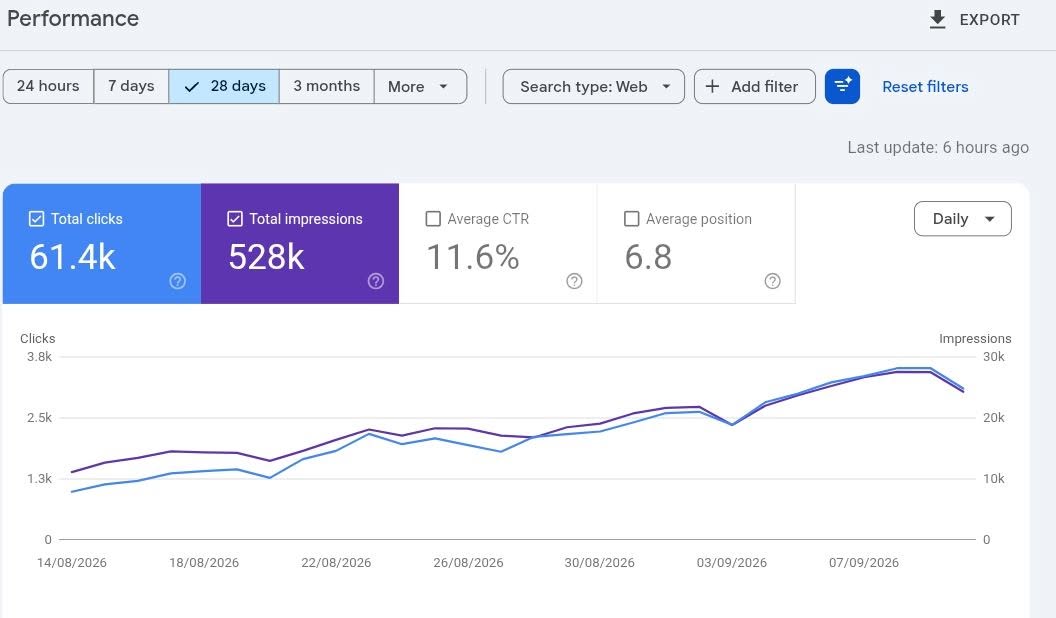
Yassinext's own Search Console. Numbers straight from Google.

Yassinext.com doesn't run on WordPress — but we apply the same SEO methodology to every CMS we audit. Visibility gains on our own site come straight from Google.

Clicks · 28 days
61.4k
Impressions
528k
Average CTR
11.6%
Average position
6.8

Source: Google Search Console — yassinext.com, last 28 days.

Search Console — yassinext.com

WordPress audit pricing

How much does a WordPress SEO audit cost?

Price depends on site size, number of languages, and scope (audit alone vs monthly engagement). A free audit in 5 days always precedes the paid proposal.

See SEO pricing in Morocco
WordPress Starter5,000 MAD · site < 500 pages · 3 weeks
WordPress Standard10,000 MAD · site < 5,000 pages, multilingual · 4 weeks
Monthly engagement5,000 to 15,000 MAD/mo · audit + writing + technical

FAQ

What decision-makers ask on a WordPress audit.

Six answers to frame your project before the first exchange.

Yoast or Rank Math — which to choose?
Rank Math by default for most cases: more native features (schema, redirections, 404 monitoring, cannibalization check), modern interface, richer free version. Yoast remains valid for heavy editorial sites (press, magazine) and WordPress multisite — its ecosystem is more mature on these cases. We migrate from one to the other without problem if needed, settings are transferable.
Can I keep my current theme or do I need to migrate?
If the theme has mobile LCP < 2.5 s and INP < 200 ms (measured in Search Console → Core Web Vitals), we keep it and optimize at the margin. If the theme is red on CWV and potential SEO gain is significant, we recommend migration to a light theme (GeneratePress, Blocksy, Astra) preserving the visual structure. Decision is made after audit, not before.
Do I need WP Rocket or is hosting cache enough?
LiteSpeed hosting (Cloudways, LWS) → free LiteSpeed Cache is enough, no WP Rocket needed. Classic hosting (OVH, Hostinger, GoDaddy) → WP Rocket is worth its price ($49/year): page cache + CSS/JS optimization + lazy load image, in a single clean installation.
WPML or Polylang for multilingual?
WPML is the pro choice ($99/year): mature interface, clean native hreflang, complete string translation. Polylang (free, Pro at €99) is viable but more limited on third-party plugin string translations. For FR/EN/AR Morocco, both work — we recommend WPML if you translate many plugins (WooCommerce, Yoast, etc.).
How long for SEO results after a WordPress audit?
Technical quick wins (noindex archives, image compression, Yoast/RM config): measurable effect in 2-6 weeks. Editorial work (pillar page writing, FAQ, linking): 2-6 months. Link building: 3-9 months. The audit combo activates all three axes in parallel.
Can you intervene on my WordPress or does my dev have to apply?
Both options. Audit-only pack: we deliver the document, your dev applies. Monthly engagement pack: we apply ourselves (install plugins, config, create SEO pages, fix theme). Specify your preference at kickoff — we adapt scope and price.

Ready to turn WordPress into an SEO advantage?

Free WordPress audit. 10 priorities specific to your site, in 5 days.

You submit your WordPress URL, we return 10 technical and editorial priorities ranked by impact — with clear identification of problematic plugins and performance quick wins. Zero commitment.

Talk to a consultant

wordpress.